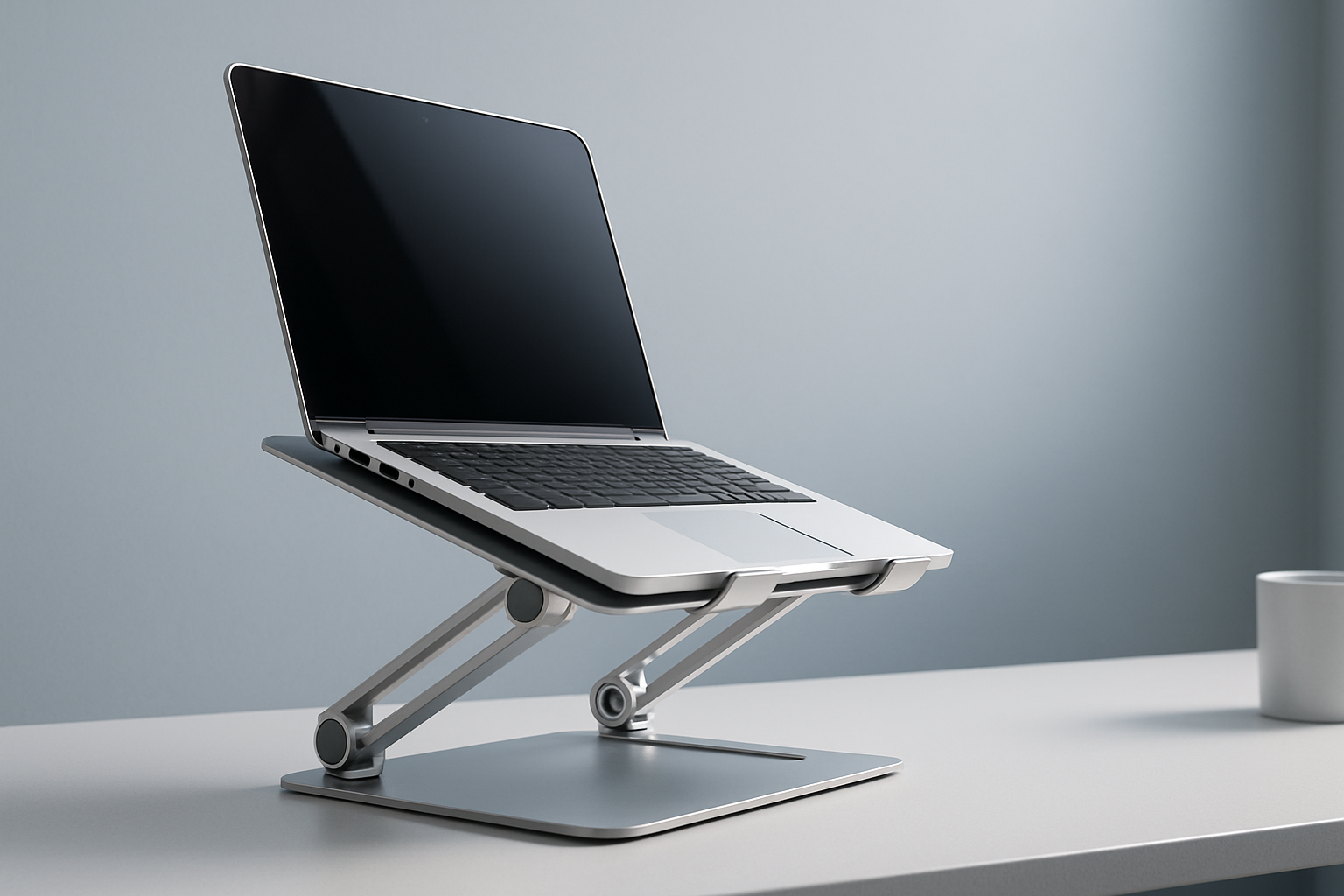
7 Picks for the Best Ergonomic Laptop Stand for Home Office
If you’re trying to find the best ergonomic laptop stand for home office work, you’re in the right place. The right stand helps bring your screen to eye level, encourages neutral wrists with an external keyboard/mouse, and makes long sessions more comfortable. Below, we’ve curated 7 reliable options—from portable travel stands to stable desktop risers and a clever sit-stand model—so you can match your posture goals, space, and budget. Prices and availability may change.
Quick Picks
- Best overall for posture range: obVus Solutions minder Laptop Tower Stand
- Best value adjustable Z-stand: BoYata Laptop Stand
- Most stylish adjustable pick: Twelve South Curve Flex
- Most stable fixed riser: Rain Design mStand Laptop Stand
- Best premium portable: Roost Laptop Stand
- Best budget portable: Nexstand K2 Laptop Stand
- Best compact sit-stand option: MOFT Z Sit-Stand Desk
Comparison Table
| Product | Best For | Adjustability | Portability | Notable Highlights | CTA |
|---|---|---|---|---|---|
| obVus Solutions minder Laptop Tower Stand | Maximum height range at a desk | Wide height/tilt range | Desktop use | Tower-style elevation for eye-level viewing | Check price on Amazon |
| BoYata Laptop Stand | Affordable adjustability | Height and tilt via Z-hinges | Moves around the house easily | Grippy platform; sturdy feel for most laptops | Check price on Amazon |
| Twelve South Curve Flex | Design-forward setup | Adjustable height and angle | Folds for storage/travel | Sleek, modern look; Mac-friendly styling | Check price on Amazon |
| Rain Design mStand Laptop Stand | Rock-solid daily workstation | Fixed height and tilt | Not portable | One-piece metal riser; stable and simple | Check price on Amazon |
| Roost Laptop Stand | Premium portability | Adjustable height | Travel-ready | Collapsible, lightweight, strong-feeling hinges | Check price on Amazon |
| Nexstand K2 Laptop Stand | Budget travel pick | Adjustable height | Very portable | Value-focused alternative to premium portables | Check price on Amazon |
| MOFT Z Sit-Stand Desk | Compact sit-stand workflow | Multiple configurations | Folds flat | Origami-inspired; quick sit-to-stand switch | Check price on Amazon |
The Best Ergonomic Laptop Stands for Home Office
Below are 7 strong options to help you dial in posture and comfort during long workdays. We drew on manufacturer information, common ergonomics guidance, and customer feedback trends. We did not conduct hands-on testing.
1) obVus Solutions minder Laptop Tower Stand
If you want a laptop truly near eye level while seated, this tower-style stand is a standout. It offers a broad range of elevation and angle options compared to low-profile risers, making it easier to align the top of your screen close to eye height while keeping shoulders relaxed. Pair it with an external keyboard and mouse for the most ergonomic setup.
Pros
- Wide height/tilt range for dialing in a neutral neck position
- Desktop-friendly stability
- Suited for longer daily sessions in a home office
Cons
- Larger footprint than minimalist risers
- Not intended for frequent travel
2) BoYata Laptop Stand
A popular Z-style aluminum stand that balances adjustability and value. The hinged design lets you raise and tilt the laptop to reduce hunching, and the broad base helps with stability on most desks. It’s a great pick for home offices where you want flexible height without spending a premium.
Pros
- Good height and tilt for the price
- Generally stable for daily typing when used with an external keyboard
- Moves easily from room to room
Cons
- Hinges may require firm adjustments
- Not as travel-friendly as fold-flat portables
3) Twelve South Curve Flex
For those who appreciate design and adjustability, Curve Flex blends a sleek aesthetic with practical height and tilt controls. It looks clean in modern setups and folds to store or transport between spaces. Especially appealing for MacBook users, but works broadly.
Pros
- Stylish, modern look that complements premium laptops
- Adjustable height and angle for ergonomic positioning
- Foldable for easier storage and occasional travel
Cons
- Design focus can mean a higher price
- Some users may prefer a heavier base for maximum rigidity
4) Rain Design mStand Laptop Stand
A classic, one-piece metal riser that prioritizes stability and simplicity. The fixed elevation is ideal if you already know the height you like—or you mainly need to lift your laptop for a secondary monitor setup. It’s a dependable, set-and-forget option for permanent desks.
Pros
- Rock-solid, wobble-resistant feel
- Clean, cable-friendly design
- Great as a stable base in dual-screen setups
Cons
- Fixed height and angle
- Not meant for travel or frequent adjustment
5) Roost Laptop Stand
A long-time favorite among remote workers, the Roost collapses small, adjusts quickly, and feels impressively sturdy for its weight. It’s ideal if you split time between rooms or occasionally work outside your home office. Pair with a compact keyboard/mouse for an ergonomic mobile kit.
Pros
- Premium portability with adjustable height
- Packs small for bags and drawers
- Known for a high-quality, travel-ready build
Cons
- Premium price compared to budget options
- Lightweight design relies on proper setup for stability
6) Nexstand K2 Laptop Stand
A budget-savvy alternative to premium portables. The K2 is light, folds up fast, and adjusts to multiple positions. It’s a smart pick if you want a packable stand without spending more for brand-name materials or finish.
Pros
- Very affordable for an adjustable portable
- Folds quickly for storage and travel
- Works well with external peripherals
Cons
- Materials feel more utilitarian than premium options
- May require careful placement for the most stable experience
7) MOFT Z Sit-Stand Desk
If you want a compact way to alternate between sitting and standing, this origami-inspired stand is a clever solution. It shifts quickly among multiple configurations for seated and short standing sessions. It’s not a full desk converter, but it’s a minimalist way to add movement to your day.
Pros
- Enables quick sit-to-stand changes in small spaces
- Folds flat for easy storage
- Versatile positions without bulky hardware
Cons
- Smaller work surface than full desk converters
- Best for light peripherals and mindful weight placement
Buying Guide: How to Choose the Right Ergonomic Laptop Stand
Ergonomic goals and posture
Your aim is to keep the top of your screen near eye level and your shoulders relaxed. Most people benefit from using an external keyboard and mouse so the laptop screen can be raised without forcing your wrists into awkward angles.
Adjustability and height range
If you’re unsure about the right height, pick an adjustable stand. Z-style hinges, tower designs, and portable “claw” stands can offer meaningful height and tilt control. Fixed risers work best when you already know what elevation you need.
Stability and build quality
A stable stand helps keep your screen from wobbling while typing. Tower-style and one-piece metal risers often feel very solid on a desk. Portable stands can be sturdy for their size but are lighter by design; set them up carefully and avoid leaning on the laptop while typing.
Desk space and footprint
Consider your desk depth and available space. Tower stands and sit-stand designs take more room. Minimalist risers save space and look cleaner. If you frequently move between rooms, a lighter, foldable design is more convenient.
Portability and storage
If you travel or hot-desk, a collapsible stand like a Roost- or Nexstand-style model is ideal. For a permanent home office workstation, a heavier riser or tower stand is often more comfortable long term.
Compatibility and size
Check the manufacturer’s guidance for supported laptop sizes and weights. Larger 15–16-inch laptops typically need broader platforms and sturdy hinges. If you use a laptop with a unique shape or very thin front edge, confirm it will rest securely.
Materials and heat dissipation
Metal stands can help with airflow due to open designs and thermal conductivity. Regardless of material, ensure the stand allows adequate ventilation and avoid blocking air intakes.
External keyboard and mouse
For ergonomics, plan on using an external keyboard and mouse. This lets you raise the laptop screen without straining wrists or shoulders.
Sit-stand needs
If you want to stand part of the day, choose a compact sit-stand stand or a full desk converter. Compact options are space-saving but support smaller setups; desk converters offer more surface area.
Budget and value
You don’t need to overspend to improve posture. Value picks can deliver strong adjustability. Premium models often add nicer finishes, smoother hinges, or sleeker styling. Choose what matches your daily use and workspace.
FAQs
Are laptop stands actually better for posture?
They can help. Raising your screen can reduce the tendency to hunch, and using an external keyboard and mouse supports more neutral wrists and shoulders. Everyone’s body is different, so adjust your setup and take breaks as needed.
Do I need an external keyboard and mouse with a laptop stand?
For most ergonomic setups, yes. Elevating the laptop screen while using the built-in keyboard forces you to reach and tilt your wrists. An external keyboard and mouse let you keep elbows roughly at your sides with neutral wrists.
How high should my laptop screen be?
A common guideline is to place the top of the screen at or slightly below eye level when you sit upright, with your shoulders relaxed. Fine-tune to comfort—small changes can make a big difference.
Can a laptop stand replace a standing desk?
Not entirely. A sit-stand laptop stand can add standing intervals, but a full desk converter or standing desk provides more surface area and accessory space. If you only need occasional standing, a compact sit-stand model can be a good compromise.
Will a stand affect laptop cooling?
Many stands improve airflow by lifting the device and exposing more surface area. Avoid blocking air intakes and keep vents clear. If your laptop runs warm, consider a stand with open areas under the chassis.
Is it safe to use a stand with a 16-inch or gaming laptop?
It can be, but check the product’s guidance for size and weight. Heavier laptops benefit from wider platforms and robust hinges. Place the stand on a stable surface and avoid pushing down hard on the palm rest while typing.
Conclusion
An ergonomic stand can transform your home office comfort by lifting your screen and encouraging better posture—especially with an external keyboard and mouse. For broad adjustability at a desk, the obVus Solutions minder Laptop Tower Stand is a top pick. If you want great value, BoYata’s Z-style stand is hard to beat. Prefer something portable? The Roost and Nexstand K2 collapse small for travel. And if you want to add standing into your day without a full desk converter, the MOFT Z is a smart, compact solution.
Compare your space, posture goals, and portability needs, then choose the stand that fits your workflow. Prices and availability may change, so check current details before purchasing.
コメント